Overview
ExoAssist guides first-time users through putting on industrial exoskeletons independently. The app combines instructional videos, step-by-step guides, and an AI chatbot to provide multimodal learning for users with no prior experience.
I designed the initial interface in Figma, architected the cross-platform codebase, and developed 95% of the functionality before onboarding a junior developer for UI refinements.
Problem
Industrial exoskeletons improve worker safety, but their complexity creates adoption barriers. Users must learn precise donning sequences involving multiple fastening points, battery insertion, and support adjustments. Traditional paper manuals are inadequate for hands-on learning, while in-person training sessions aren’t scalable across multiple worksites.
Solution
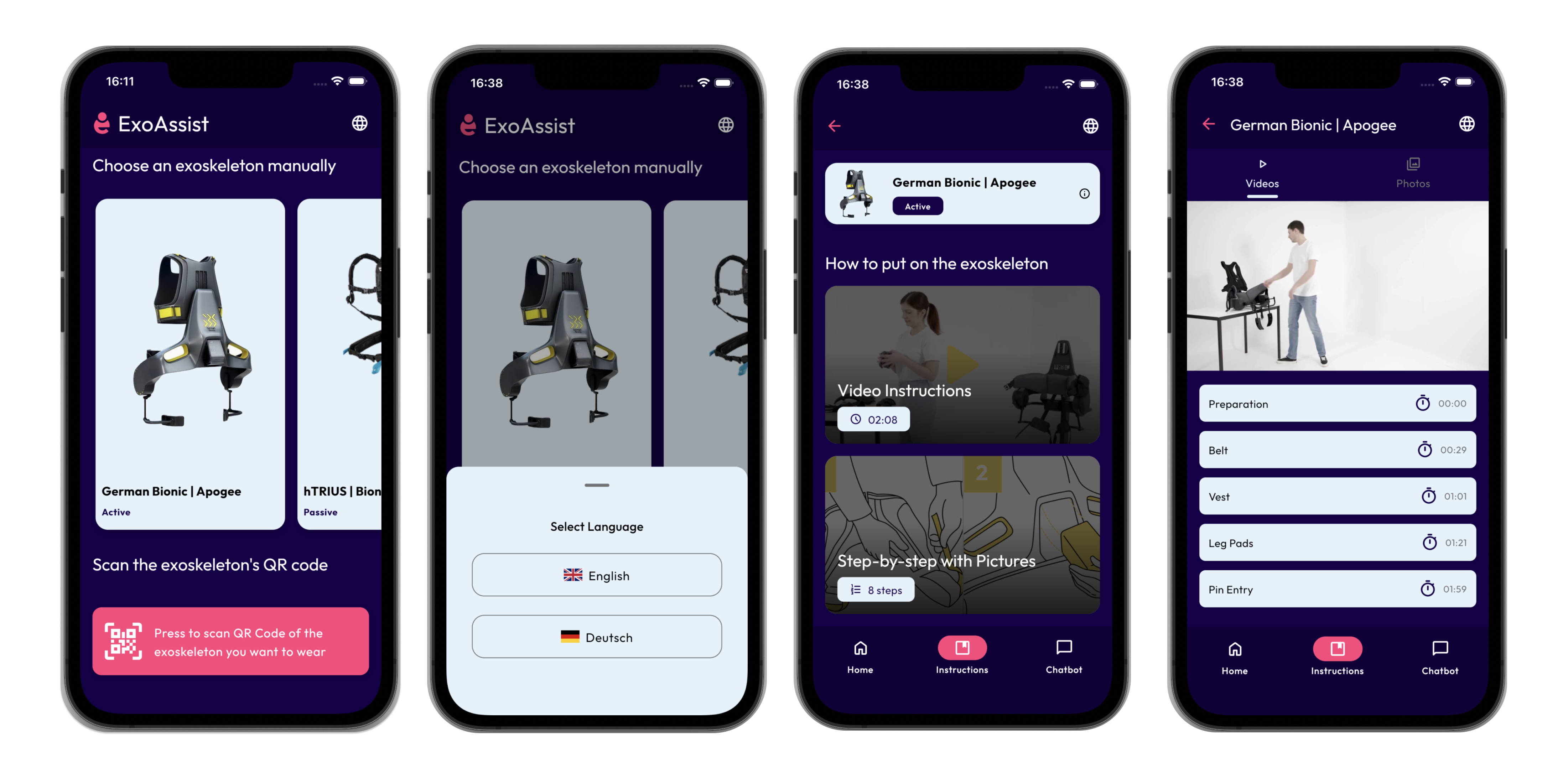
A cross-platform mobile app offering three instruction modes:
- QR code scanning matches physical exoskeletons to their specific instructions
- Interactive video with custom timestamp markers for jumping to relevant steps
- Step-by-step visual guide with progress tracking
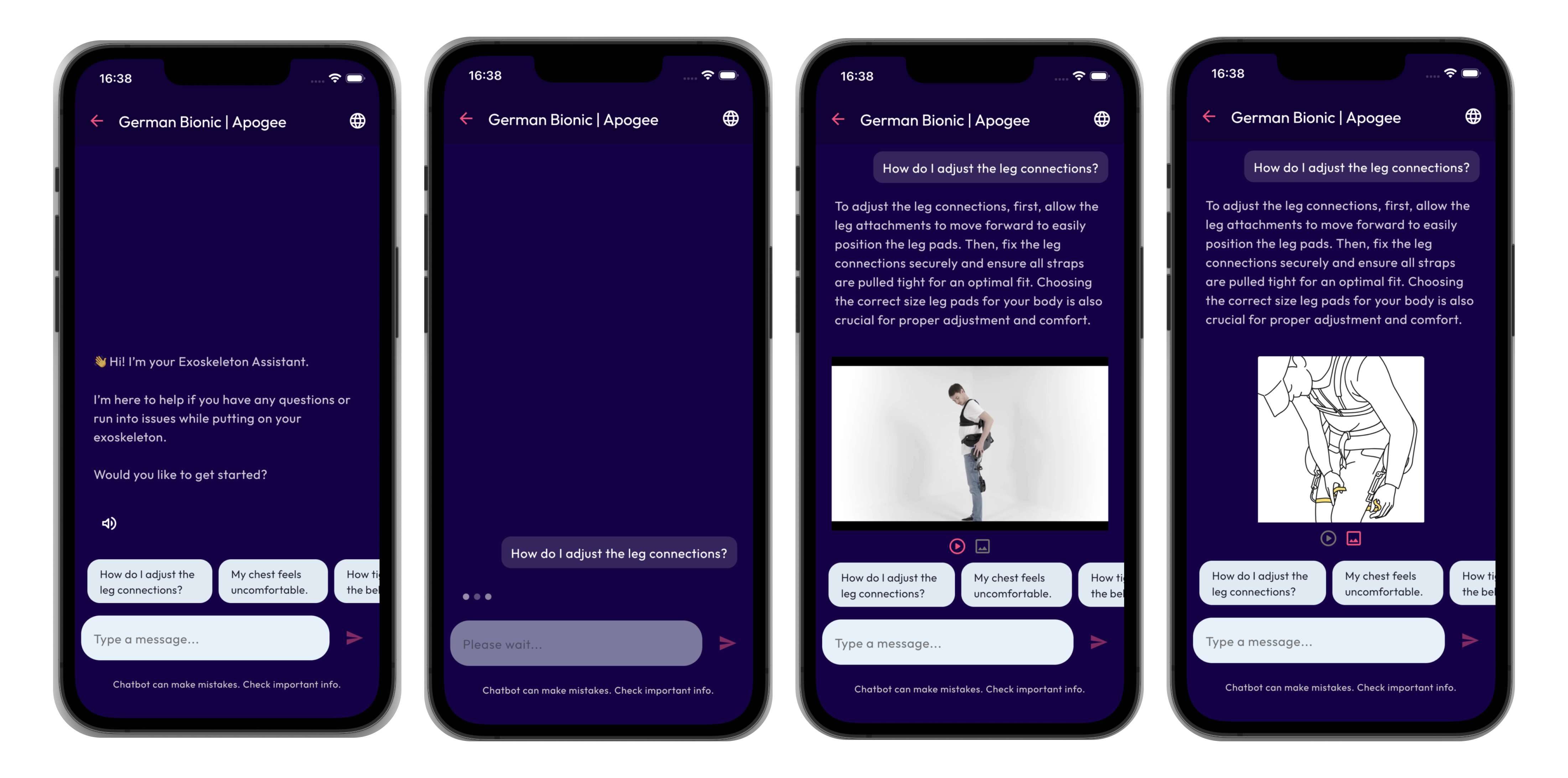
- AI chatbot provides contextual help using Gemini API with PDF manual context
Core content works offline and supports English/German localization. Speech input enables hands-free interaction, while text-to-speech (English only) reads chatbot responses aloud.
Technical Approach
Architecture. I chose MVI (Model–View–Intent) to keep state predictable across platforms and features in a shared Kotlin codebase, which is particularly useful in multiplatform projects with complex UI flows like ExoAssist.
Cross-platform video playback. iOS uses AVPlayer while Android relies on ExoPlayer, so I implemented platform-specific video handling behind a shared interface for the common UI layer.
Offline-first with AI enhancement. Local JSON powers core step data and suggested prompts offline, while the Gemini API and compressed PDF manuals handle more detailed questions, with basic caching to keep responses fast within free tier limits.
Scalable data structure. New exoskeletons can be added by updating a single JSON file with steps, markers, and assets, while translations are handled via separate resource files so non-technical contributors can localize content.
Accessibility. Speech input and platform-specific text-to-speech (English) support hands-free use, which is important when users are wearing or handling equipment.
Outcomes & Impact
ExoAssist currently functions as a research platform, not a production deployment. It provides the technical infrastructure to explore multimodal instruction for exoskeleton onboarding rather than attempting to answer all usability questions.
- Research contributions. Enabled studies on how users interact with different instructional formats (video, step-by-step, chatbot) and supports separate, ongoing research into instructional content design and novice comprehension in the context of my master’s thesis.
- Technical achievements. Achieved a high level of code sharing across iOS and Android, an offline-first architecture with optional cloud-enhanced AI, and a modular setup that already supports multiple exoskeleton models.
- Industry interest. Stakeholders showed interest in solutions like ExoAssist for training scenarios, with the understanding that wider adoption depends on the outcomes of the parallel instructional design research.
Current status: a proof-of-concept and research tool that also served to validate the architecture and documentation quality, as another developer could join and contribute UI improvements with minimal onboarding.
Key Learnings
- Plan for platform constraints early. Investigating video and media limitations upfront avoided major refactors later in the project.
- Predictable state pays off. A stricter pattern like MVI felt heavier at first but reduced state-related bugs as features grew, especially in a shared, multiplatform setup.
- Optimize AI integration. Even in a research setting, small optimizations like basic context handling helped keep latency and usage within acceptable limits.